
What Is Schema Markup in SEO? Benefits, Types & Practical Examples

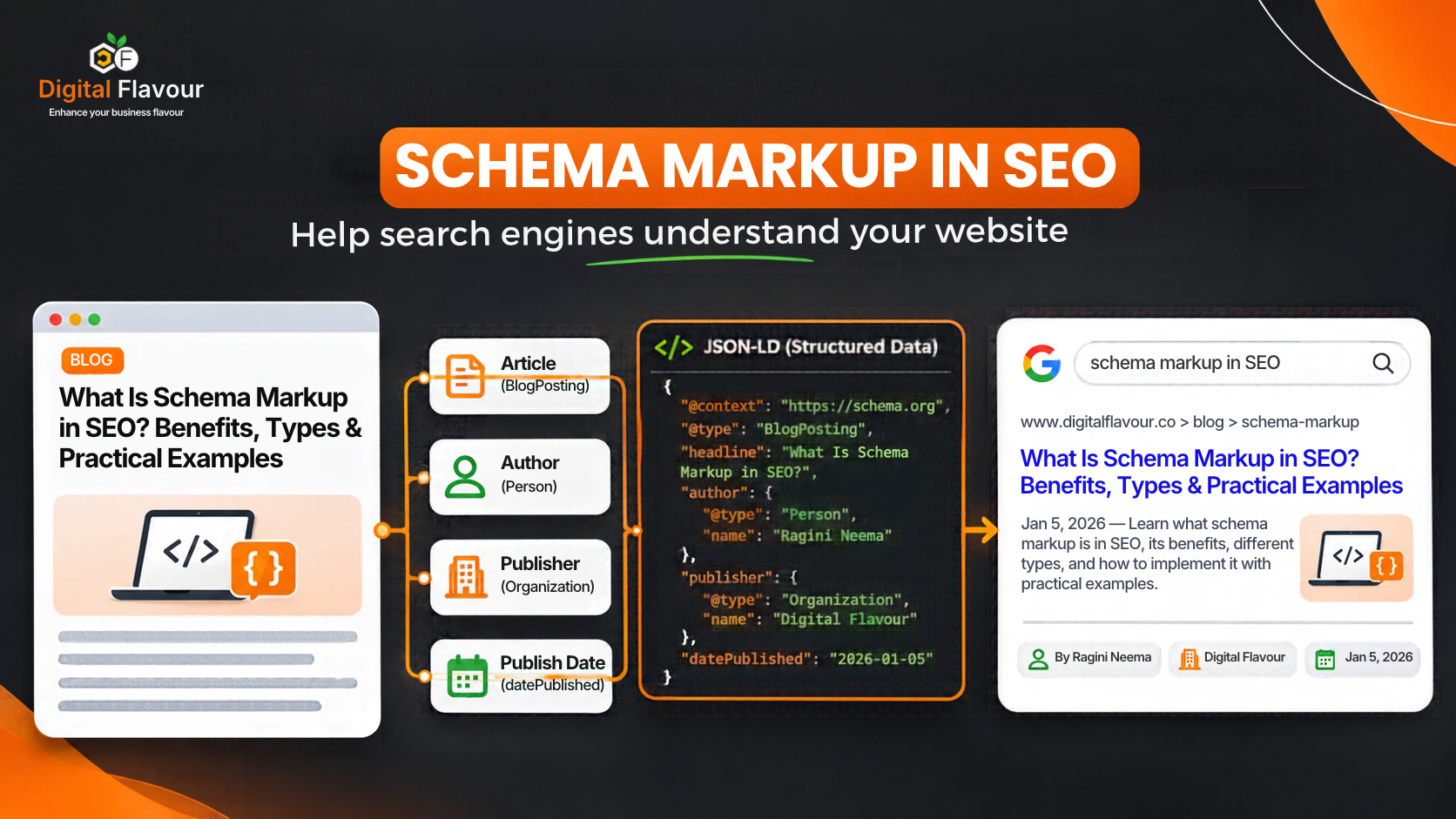
Table of Contents
When you search for a product, a local business or an article on Google, you may notice that some results display additional information, such as product prices, ratings, breadcrumbs, event dates or business details.
Have you ever wondered how Google understands which information belongs to a product, who wrote an article or what a business offers?
One way websites communicate this information is through schema markup.
Schema markup helps search engines interpret the information on a webpage by describing its content in a structured, machine-readable format. It can help search engines identify entities such as businesses, products, articles, people and services.
However, adding schema markup does not automatically improve rankings or guarantee enhanced search appearances. It needs to be relevant, accurate and correctly implemented.
In this guide by Digital Flavour, Best Digital Marketing Agency SEO Team has explain what schema markup in SEO means, explore its different types, walk through practical JSON-LD examples and show you how to implement, test and troubleshoot structured data on your website.
What Is Schema Markup in SEO?
Schema markup in SEO is a form of structured data that website owners add to their webpages to help search engines understand the meaning and context of their content.
It uses vocabulary from Schema.org, a collaborative initiative supported by major search engines, to describe information about entities such as organizations, people, products, articles, events and local businesses.
Think of it this way: a webpage might contain the name of a company, its address, phone number and services. A visitor can understand this information by reading the page. Search engines can also process the text, but structured data provides additional, explicitly labelled context about what each piece of information represents.
For example:
- A company name can be identified as an organisation.
- An article headline can be identified as the headline of a blog post.
- A person’s name can be connected to an author profile.
- A product name can be associated with its price and availability.
- A business address can be identified as a postal address.
Schema markup does not replace your website content. It describes the content in a format that supported systems can interpret.
Schema Markup vs Structured Data vs Schema.org
These terms are often used interchangeably, but they do not mean exactly the same thing.
| Term | What it means |
|---|---|
| Schema.org | A vocabulary that defines types and properties for describing information |
| Structured data | Information organised in a standardised format so machines can interpret it |
| Schema markup | Structured data that uses Schema.org vocabulary to describe webpage content |
| JSON-LD | A format commonly used to add structured data to webpages |
For example, Schema.org defines the Article type, structured data describes the article’s information in a machine-readable way, and JSON-LD is one format you can use to publish that information.
Why Is Schema Markup Important for SEO?
Search engines use many signals to understand and organise webpages. Structured data provides additional context about the content and entities described on a page.
Here are some practical ways schema markup can support your SEO strategy.
1. Helps Search Engines Understand Your Content
A webpage may mention a person, a company, a product and a location. Without explicit context, some relationships may be less clear.
Schema markup helps describe what those things are and how they relate to one another.
For example, Article markup can identify an article’s headline, author, publisher and publication date.
2. Can Make Eligible Pages Appear With Rich Results
Some types of structured data can make a page eligible for enhanced search appearances.
Depending on the supported feature and Google’s requirements, these appearances may include information such as:
- Product prices and availability.
- Breadcrumb navigation.
- Article details.
- Event information.
- Business information.
Eligibility does not guarantee that Google will display a rich result. Google decides when and how enhanced appearances are shown.
3. Helps Describe Business and Product Information
For businesses, structured data can describe details such as the organisation’s name, address, contact information and services.
For ecommerce websites, Product markup can describe information such as a product name, image, price and availability.
This gives supported search systems a more structured representation of information already presented to visitors.
4. Supports a More Consistent Understanding of Entities
A website may mention the same business across its homepage, About page, service pages and blog posts.
Using consistent entity identifiers, such as @id in JSON-LD, can help describe when different references relate to the same organisation or person.
This is especially useful when a website contains many interconnected pages.
Is Schema Markup a Direct Google Ranking Factor?
No. Schema markup is not a direct ranking factor that automatically improves a webpage’s organic position.
Its established SEO value is in helping search engines interpret page information and making eligible pages suitable for supported rich-result features.
A correctly implemented schema does not guarantee higher rankings, more traffic or a rich result.
Different Types of Schema Markup
There are many schema types available through Schema.org. However, you should not add every schema type to every webpage.
The right choice depends on the content, purpose and visible information on that particular page.
Here are some commonly used types.
1. Organization Schema
Organization schema describes a company or organisation.
It can include information such as:
- Business name.
- Official website.
- Logo.
- Contact details.
- Social media profiles.
- Other identifying information.
Best suited for: Company websites and organisation pages.
For example, a digital marketing agency can use Organization markup to describe its business identity.
2. LocalBusiness Schema
LocalBusiness is used to describe a business with a physical location or local business presence.
It can include details such as:
- Business name.
- Address.
- Phone number.
- Opening hours.
- Geographic location.
- Business category.
Where possible, choose the most specific applicable subtype, such as Restaurant, Plumber or Dentist.
Best suited for: Eligible local businesses with accurate business and location information.
Do not use LocalBusiness simply because a company serves customers in a particular city. The markup must accurately describe the business and its actual details.
3. Article and BlogPosting Schema
Article and BlogPosting describe editorial content published on a website.
Common properties include:
- Headline.
- Author.
- Publisher.
- Publication date.
- Modification date.
- Featured image.
Best suited for: Blog posts, news articles and editorial content.
For a blog article, BlogPosting is often an appropriate choice.
4. Product Schema
Product schema describes a product and its associated information.
Depending on the implementation, it may include:
- Product name.
- Description.
- Image.
- Brand.
- Price.
- Availability.
- Review information.
Best suited for: Ecommerce product pages and eligible product-focused content.
Product structured data must accurately represent the product information visible to users. Do not add invented prices, ratings or availability.
5. BreadcrumbList Schema
BreadcrumbList describes the breadcrumb navigation hierarchy of a webpage.
For example:
Home → Blog → SEO → Schema Markup
It helps describe how a page fits within the website’s structure.
Best suited for: Websites with meaningful hierarchical navigation.
6. Person Schema
Person schema describes an individual, such as an author, professional or public-facing expert.
It can include:
- Name.
- Job title.
- Profile URL.
- Image.
- Professional description.
- Relevant profile links.
Best suited for: Author profiles, team profiles and professional biography pages.
7. VideoObject Schema
VideoObject describes video content published on a webpage.
Common properties include:
- Video name.
- Description.
- Thumbnail image.
- Upload date.
- Video URL or embed information.
Best suited for: Pages where video is an important part of the content.
8. Service Schema
Service describes a service offered by a business.
For example, an agency can describe services such as SEO consulting, website design or paid advertising.
However, Service is a Schema.org vocabulary type, not a guarantee of a dedicated Google rich-result feature.
Best suited for: Service pages where the markup accurately describes the service presented to visitors.
Which Schema Type Should You Use on Your Website?
Use this table as a starting point:
| Page type | Schema to consider |
|---|---|
| Company homepage | Organization |
| Local business website | Appropriate LocalBusiness subtype |
| About the company | Organization and relevant Person entities |
| Blog article | BlogPosting or Article |
| Author profile | Person |
| Product page | Product |
| Service page | Service |
| Breadcrumb navigation | BreadcrumbList |
| Video page | VideoObject |
More than one schema type can be appropriate on a webpage. The important thing is that each describes something genuinely present on that page and that the relationships between entities are accurate.
How Does Schema Markup Work?
Schema markup provides structured information about the content of a webpage.
A simplified example looks like this:
- A website publishes an article.
- The article contains a headline, author name, publication date and featured image.
- The website adds JSON-LD that describes those details using Schema.org properties.
- A search engine crawls the page and may process the structured data.
- The search engine uses the available information as part of its understanding of the page and determines whether any supported search feature is appropriate.
The important point is that schema markup describes information. It does not force a search engine to rank a page or display a particular feature.
JSON-LD vs Microdata vs RDFa: Which Format Is Better?
Schema.org vocabulary can be implemented using different structured data formats.
The three commonly supported formats are JSON-LD, Microdata and RDFa.
| Format | How it works | Practical consideration |
|---|---|---|
| JSON-LD | Adds structured data in a separate script block | Easier to maintain separately from page content |
| Microdata | Adds structured data attributes to HTML elements | Markup is embedded within the visible HTML |
| RDFa | Uses HTML attributes to describe structured information | Can be useful in existing semantic HTML implementations |
Google generally recommends JSON-LD when your website setup allows it because it is easier to implement and maintain.
For most new implementations, JSON-LD is a practical starting point.
How to Implement Schema Markup on a Website

This is the part where many introductory guides stop too early. Understanding what schema markup is does not mean you know how to implement it correctly.
Let’s walk through a practical process.
Step 1: Identify the Purpose of the Page
Before generating any schema markup, understand what the webpage is actually about.
Ask yourself:
- Is this a company homepage?
- Is this a blog article?
- Is this a product page?
- Is this a local service page?
- Is this an author profile?
For example, if you are adding structured data to a blog article about schema markup, BlogPosting is a sensible starting point.
Do not choose a schema type simply because it appears in a list of popular schema types.
Step 2: Identify the Information That Is Actually Visible
Review the webpage and collect the relevant information.
For a blog article, this may include:
| Information | Example |
|---|---|
| Headline | What Is Schema Markup in SEO? |
| Author | Ragini Neema |
| Publisher | Digital Flavour |
| Publication date | Actual publication date |
| Modification date | Actual last substantial update |
| Featured image | Actual article image |
| Article URL | Canonical article URL |
Make sure these details match the published webpage.
Step 3: Generate the JSON-LD Markup
Once you have identified the relevant information, create the JSON-LD.
Here is an illustrative BlogPosting example for a Digital Flavour article.
Important: The article URL, author profile URL, image URL and dates below must be replaced with the real published values. This is an implementation example, not verified production markup.
<script type="application/ld+json">
{
  "@context": "https://schema.org",
  "@type": "BlogPosting",
  "@id": "https://www.digitalflavour.co/REPLACE-ARTICLE-URL/#article",
  "mainEntityOfPage": {
    "@type": "WebPage",
    "@id": "https://www.digitalflavour.co/REPLACE-ARTICLE-URL/"
  },
  "headline": "What Is Schema Markup in SEO? Benefits, Types & Practical Examples",
  "description": "Learn what schema markup in SEO means, explore common schema types, and understand how to implement and validate JSON-LD on your website.",
  "image": [
    "https://www.digitalflavour.co/REPLACE-WITH-ACTUAL-IMAGE.jpg"
  ],
  "datePublished": "REPLACE-WITH-ACTUAL-PUBLICATION-DATE",
  "dateModified": "REPLACE-WITH-ACTUAL-MODIFICATION-DATE",
  "author": {
    "@type": "Person",
    "@id": "https://www.digitalflavour.co/REPLACE-AUTHOR-PROFILE/#person",
    "name": "Ragini Neema",
    "url": "https://www.digitalflavour.co/REPLACE-AUTHOR-PROFILE/"
  },
  "publisher": {
    "@type": "Organization",
    "@id": "https://www.digitalflavour.co/#organization",
    "name": "Digital Flavour",
    "url": "https://www.digitalflavour.co/"
  }
}
</script>
This example connects the article to its author and publisher.
Notice that the author and publisher have their own identifiers. This helps describe the relationship between different entities rather than treating every name as an isolated piece of text.
Step 4: Understand How @id Connects Entities
The @id property gives an entity a unique identifier within the structured data graph.
For example:
https://www.digitalflavour.co/#organizationidentifies the organisation.https://www.digitalflavour.co/author-profile/#personidentifies the author.https://www.digitalflavour.co/article-url/#articleidentifies the article.
When another page references the same organisation identifier, it can indicate that both pages are referring to the same entity.
This is useful for websites that publish multiple articles, maintain author profiles and have several service pages.
However, do not create arbitrary identifiers for the sake of adding more markup. Use consistent, stable identifiers that genuinely represent the entities on your website.
Step 5: Add Schema Markup to Your Website
There are different ways to add JSON-LD, depending on how your website is built.
Method A: Add Schema Using WordPress and Rank Math
If your website uses WordPress, an SEO plugin such as Rank Math can simplify structured data implementation.
A typical workflow is:
- Open the WordPress dashboard.
- Navigate to the page or post you want to optimise.
- Open the Rank Math SEO settings.
- Locate the Schema or Schema Generator section.
- Select an appropriate schema type.
- Fill in the required and relevant properties.
- Save or update the page.
- Test the published URL.
Rank Math and other SEO plugins may automatically generate schema for certain content types.
Before adding additional custom JSON-LD, check what the plugin and theme already output. Otherwise, you may introduce duplicate or conflicting markup.
The exact menu labels and available schema options can vary between plugin versions.
Method B: Add JSON-LD to a Custom Website
If your website is built using React, Next.js, another JavaScript framework or a custom CMS, you can add JSON-LD to the page’s HTML output.
For example, in React, a JSON-LD object can be serialised into a script element:
const schema = {
  "@context": "https://schema.org",
  "@type": "BlogPosting",
  "headline": "What Is Schema Markup in SEO?",
  "author": {
    "@type": "Person",
    "name": "Ragini Neema"
  },
  "publisher": {
    "@type": "Organization",
    "name": "Digital Flavour"
  }
};

function ArticleSchema() {
  return (
    <script
      type="application/ld+json"
      dangerouslySetInnerHTML={{
        __html: JSON.stringify(schema)
      }}
    />
  );
}
This is a simplified example. In production, populate the schema from the actual article data, use the correct canonical URLs and dates, and safely serialise the JSON-LD to prevent script injection issues.
For JavaScript-rendered websites, check the rendered HTML and confirm that Google can access the structured data. Do not assume that adding code to a component automatically means the final page has correct markup.
Step 6: Test the Published Page
After implementing schema markup, test the live URL.
Do not stop after checking whether your JSON is syntactically correct. You also need to confirm that the page contains the right information and that the markup represents the visible content.
How to Test and Validate Schema Markup
Use these tools for different validation purposes.
1. Google Rich Results Test
Use this tool to check whether your page contains structured data eligible for supported Google rich-result features.
It can identify supported structured data items and report errors or warnings relevant to those features.
Remember: passing the test does not guarantee that Google will display a rich result.
2. Schema Markup Validator
This tool checks Schema.org structured data more broadly.
It is useful when you want to inspect schema types, properties and relationships that may not be eligible for a dedicated Google rich-result feature.
3. Google Search Console
After deployment, use Search Console to monitor relevant enhancement reports, URL indexing and other available search performance information.
For a proper validation workflow:
- Test the page using the Rich Results Test.
- Inspect the markup with Schema Markup Validator.
- Check the indexed page in Search Console.
- Review relevant enhancement reports where available.
- Recheck the page after major website or template changes.
Common Schema Markup Problems and How to Fix Them
Even when schema markup looks correct, implementation problems can prevent it from working as intended.
Here are some issues worth checking during an SEO audit.
| Problem | Why it happens | How to fix it |
|---|---|---|
| Invalid JSON syntax | Missing commas, quotation marks or brackets | Correct the JSON structure and retest |
| Wrong schema type | The markup does not describe the page’s actual purpose | Choose a type that accurately represents the visible content |
| Missing required properties | A supported rich-result feature requires additional information | Check the relevant Google documentation and add accurate information |
| Duplicate schema | Multiple plugins, themes or custom scripts generate overlapping markup | Inspect the rendered page and consolidate the implementation |
| Incorrect author information | The author in the markup does not match the published article | Use the actual author and a relevant profile URL |
| Outdated product information | Price or availability differs from the current product page | Update the markup from the current product data |
| Hidden or misleading information | Structured data describes information users cannot see | Align the markup with the visible page content |
| Schema does not produce a rich result | The feature is not eligible, not selected or the page does not meet all requirements | Check eligibility, content quality and Search Console reports |
What If Your Schema Is Valid but Google Does Not Show a Rich Result?
This is one of the most common misunderstandings about structured data.
A valid result in the Rich Results Test only indicates that the tested markup meets the tool’s relevant technical checks. It does not guarantee a rich result.
Google may choose not to show an enhanced appearance because of the search query, device, location, page quality, content relevance or other systems and requirements.
The right approach is to check the page’s eligibility and implementation, rather than repeatedly adding more schema types.
Does Schema Markup Help With AI Search?
Search behaviour is changing. People now use tools such as Google AI Overviews, Google AI Mode, ChatGPT and Perplexity to explore questions, compare options and find information.
This raises an important question: does schema markup help a website appear in AI-generated answers?
Schema markup can provide structured descriptions of entities, content and relationships. This is useful as part of a well-maintained website and its broader structured data strategy.
However, there is no reliable basis for claiming that adding schema markup automatically increases the chances of being cited by ChatGPT, Gemini or Perplexity.
Google’s guidance for AI Overviews and AI Mode says that existing SEO fundamentals remain relevant and that no special schema.org markup is required for inclusion in those experiences.
For better search visibility, focus on:
- Publishing useful, accurate and original content.
- Making important information accessible as text.
- Maintaining clear website structure and internal links.
- Keeping business and author information consistent.
- Ensuring structured data accurately reflects visible content.
- Maintaining technical accessibility and indexability.
- Demonstrating genuine expertise and experience.
Think of schema markup as one part of your website’s information architecture, not a shortcut to AI visibility.
Frequently Asked Questions About Schema Markup in SEO
1. What is schema markup in SEO?
Schema markup in SEO is structured data that describes the content and entities on a webpage using Schema.org vocabulary. It helps supported search systems interpret information such as articles, products, organisations and local businesses.
2. Does schema markup improve Google rankings?
Schema markup is not a direct Google ranking factor. It can help search engines interpret content and make eligible pages suitable for supported rich-result features, but it does not guarantee higher rankings.
3. Which schema markup is best for SEO?
There is no single best schema type for every website. The appropriate type depends on the page. For example, BlogPosting can describe a blog article, Product can describe a product page, and Organization can describe a company.
4. Is JSON-LD better than Microdata?
Google generally recommends JSON-LD because it is easier to implement and maintain in many website setups. However, Google supports JSON-LD, Microdata and RDFa when correctly implemented.
5. Can I use multiple schema types on one webpage?
Yes. A webpage can describe multiple relevant entities. For example, a blog article may include BlogPosting, Person and Organization entities. The markup should accurately represent the visible content and maintain clear relationships.
6. How do I check whether schema markup is working?
Use Google’s Rich Results Test to check eligibility for supported rich-result features, Schema Markup Validator to inspect Schema.org markup, and Google Search Console to monitor relevant reports and indexing.
7. Does schema markup help ChatGPT or Google AI Overviews cite my website?
Schema markup can describe information and relationships in a structured format, but it does not guarantee AI citations. Google says no special schema markup is required for AI Overviews or AI Mode. Focus on useful, accurate content and strong technical SEO fundamentals.
8. Should every webpage have schema markup?
Not every page needs the same schema type or a separate custom implementation. Add relevant structured data where it accurately describes the page and supports a useful purpose. Avoid adding unnecessary or misleading markup.
Conclusion
Schema markup is an important part of a well-structured website. It helps describe the information on a webpage in a format that supported search systems can interpret.
But successful implementation is not about adding as many schema types as possible. It is about choosing the right type, using accurate information, connecting relevant entities and validating the result.
Whether you manage a business website, an ecommerce store or a blog, start with the purpose of each page. Add only the structured data that genuinely represents its content, and keep it updated as your website changes.
If you are unsure whether your website’s structured data is implemented correctly, a technical SEO audit can help identify errors, duplication and opportunities to improve your site’s information structure.
About the Author
Ragini Neema — Founder, Digital Flavour
Ragini Neema is the Founder of Digital Flavour and a digital marketing professional with over six years of experience. She has worked with startups and enterprise businesses, helping them strengthen their online presence through SEO, website optimisation, social media marketing and paid advertising.
Her work focuses on practical digital marketing strategies, improving website visibility, optimising content and helping businesses connect with the right audiences.
Need Help with Your Digital Marketing?
Let our experts help you achieve your business growth goals with proven strategies.
Get Free Consultation